AI Chatbots for Childcare and Daycare Centers: Answering Enrollment, Tuition, and Schedule Questions Automatically
Updated October 1, 2026 · 8 min read
Searching for childcare is one of the more anxious kinds of shopping a parent does online, and it almost never happens during a center's office hours. It happens at 9pm after the kids are asleep, or during a lunch break, scrolling through a handful of center websites trying to narrow down a shortlist before making any calls. A chatbot that can actually answer those late-night questions does more for enrollment than most directors expect from a website widget.
What parents are actually asking
The questions are remarkably consistent across centers: do you have an opening in my child's age group, what's tuition and does it change by age or schedule, what's your teacher-to-child ratio, what's a typical day look like, do you require specific immunizations or paperwork before the first day, and do you offer drop-in or part-time care versus full-time only. None of these are complicated questions. They're just ones a parent wants answered before deciding whether a phone call or a tour is even worth scheduling.
Why a contact form loses parents a center never hears from
A form that says "contact us for availability" asks a parent to commit time to a center they haven't vetted yet, competing against four or five other tabs open in the same browser. Most won't fill it out, they'll just move to the next center on the list that answers the question directly on the page or through a chat widget. A chatbot that can say "yes, we have two openings in the toddler room starting next month" immediately keeps that parent in the conversation instead of losing them to whichever competitor answered faster.
Enrollment and waitlist questions
A center-specific chatbot, trained on your actual enrollment page and current openings, can answer whether a given age group has space, what the waitlist process looks like if it doesn't, and what documents are needed to start (immunization records, enrollment forms, emergency contacts). This is also where keeping the source page current matters most: a chatbot answering from a stale openings page is worse than no answer at all, since it sends a parent down a path that turns out to be wrong once they call.
Tuition and schedule questions without a phone call
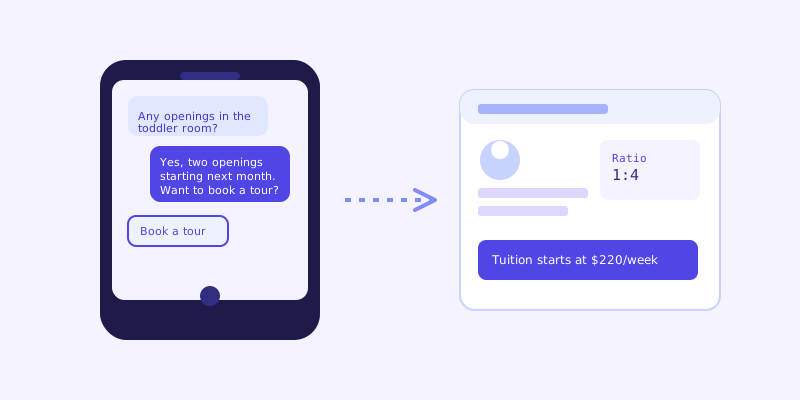
Tuition structures in childcare are rarely one flat number, full-time versus part-time, infant versus preschool rates, a sibling discount, a registration fee. A chatbot trained on your actual rate sheet can walk a parent through the specific combination that applies to their situation instead of making them call during business hours just to hear a number they could have read on the site, as long as that rate sheet is current and actually published somewhere the crawl can reach.
Ratios, accreditation, and the questions that build trust
Parents researching childcare are also evaluating safety and quality, not just logistics. Teacher-to-child ratios, state licensing status, staff background check policies, and any accreditation (NAEYC and similar) are exactly the kind of detail a chatbot can surface immediately from your licensing or about page, rather than making a parent hunt for a PDF buried three clicks deep, or worse, assume you don't have the answer because they couldn't find it.
Where a chatbot should hand off instead of answering
Some questions genuinely need a person: a child with a specific medical need, a custody-related drop-off question, or anything involving an incident report. A well-configured chatbot should recognize when a question crosses from general information into something requiring a director's judgment and hand it off cleanly, offering a phone number or a way to request a callback rather than attempting to answer something it shouldn't.
Getting it right for a childcare website
The source content matters more here than in most verticals, since parents are making a decision that directly affects their child's day-to-day care. Keep your openings, tuition, ratios, and enrollment requirements current on the actual site, and a crawl-based chatbot turns that content into instant answers for the exact moment a parent is deciding whether your center is worth a phone call.
Frequently asked questions
Can a chatbot tell parents about current openings?
Yes, as long as your website's openings or enrollment page is kept current. The chatbot answers from that page directly, so it's only as accurate as the information published there, which is why updating it when availability changes matters more than for pages that rarely change.
Can the chatbot explain our tuition structure?
Yes. A chatbot trained on your actual rate sheet can walk a parent through tuition by age group, schedule type, and any discounts or fees, the same way a staff member would, without requiring a phone call during business hours.
Should the chatbot handle questions about a specific child's needs?
No, those should hand off to a staff member. A chatbot can answer general policy and enrollment questions well, but anything involving a specific child's medical needs, custody arrangements, or an incident should be routed to a person rather than answered automatically.
Will parents actually use a chatbot instead of calling?
Many will, especially outside business hours when calling isn't an option. A chatbot doesn't replace the phone call that happens once a parent is seriously interested, it captures the research phase that currently happens silently, often resulting in a parent moving on to a competitor's site without the center ever knowing they looked.
More articles
 Guides
How to Add an AI Chatbot to Your Website Without Code (2026 Guide)
A step-by-step walkthrough for adding a real AI chatbot to your website in minutes, no flow builder and no code required, plus exact install steps for WordPress, Shopify, Wix, and Squarespace.
Read article → Product & AI
Why Your Website Chatbot Keeps Saying "I'm Not Sure" (And How to Fix It)
Most AI chatbots answer from a snapshot of your site taken whenever they were last trained. Here's why that causes constant "I'm not sure" replies, and what a chatbot that checks live instead actually looks like.
Read article →