AI Chatbots for Gyms and Fitness Studios: Answering Class Schedule, Membership, and Trial Questions Automatically
Updated September 10, 2026 · 7 min read
A boutique fitness studio's front desk fields the same handful of questions all day: is there room in the 6am class, how much does a drop-in cost versus a membership, and can I try a class before committing. None of these questions require a person to answer well. They just require someone answering at all, and for most studios that's exactly the problem outside staffed hours.
The questions that fill up a studio's inbox
Across gyms, yoga studios, and boutique fitness businesses, the same small set of questions accounts for most pre-signup chat volume: what classes run today or this week, what a drop-in or single class costs versus a membership, whether a specific class still has room, what a free trial or intro offer includes, and what to bring or wear to a first class. None of these are complicated on their own. They're also, in most cases, already written down somewhere on a studio's website: a class schedule, a pricing page, a trial offer, and a first-timer's guide.
Why a crawl-based chatbot fits a studio's site well
A chatbot that reads a studio's website directly fits this pattern well because the raw material a front desk repeats all day is usually already published for members to check themselves. Point the crawler at the site, and the same class descriptions, pricing tiers, and trial offer language that was written for a browsing visitor becomes what the bot answers from. Update the schedule or add a new class format, and the next crawl picks it up automatically, with no separate step to re-teach the bot what changed.
The part a static crawl gets wrong: class capacity
Pricing and the general weekly schedule are relatively stable. Whether a specific class still has an open spot is not, and it can change within minutes as people book or cancel. A chatbot working from a stored snapshot will happily tell someone a class has room when it filled up an hour ago, which sends a member to show up for nothing. This is where a live re-check earns its keep: when a stored answer about a specific class's availability scores low confidence, or the question is inherently time-sensitive, the stronger approach re-fetches the actual schedule or booking page before answering instead of repeating a stale count. The fresh answer folds back into the knowledge base, so the next person asking about that same class slot gets a current answer without another live check.
What this looks like across studio types
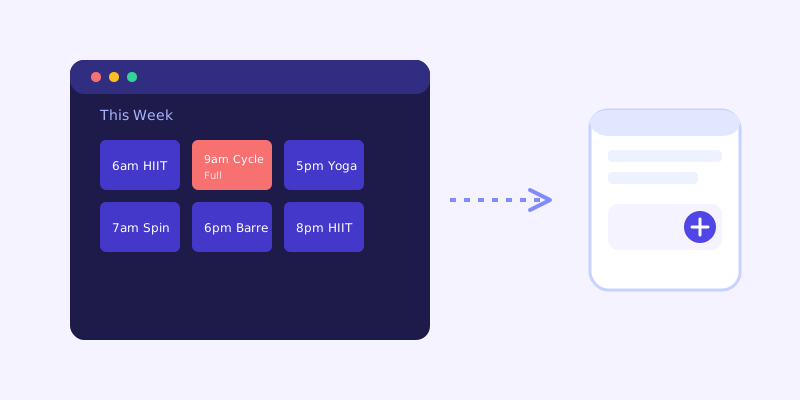
A boutique fitness studio, think cycling, HIIT, or barre, tends to get the heaviest volume of capacity questions, since classes are typically capped and popular time slots fill fast, making the live availability check especially valuable. A traditional gym with open-access equipment gets fewer capacity questions and more about membership tiers, guest passes, and included amenities like a pool or sauna, questions that answer well from stable site content with less need for a live check. A yoga or wellness studio often adds workshop and retreat questions on top of the regular schedule, seasonal, one-off events that are worth keeping on a clearly dated page so the bot doesn't confuse an old workshop listing with a current one.
Getting your site ready before you connect a chatbot
A few checks before connecting a chatbot save most of the cleanup later. Confirm the class schedule lives as a real page or table rather than only inside a booking app widget a crawler can't read. State drop-in and membership prices clearly rather than routing every pricing question to a sign-up form. Spell out exactly what a trial or first class offer includes and any restrictions, like whether it's limited to first-time visitors. And keep a simple first-timer's page covering what to bring and wear, since it's one of the most repeated questions a front desk answers and one of the easiest to write down once.
What to check once it's live
The unanswered-question log tends to surface studio-specific gaps fast: a class format prospects ask about by a nickname that doesn't match the official schedule name, a membership freeze or cancellation policy that was never published anywhere, or a question about parking or changing rooms that the site never thought to mention. Each is a small content fix, and each one closes a gap that was previously either an unanswered email or a person showing up confused.
The actual payoff
The value isn't answering a hard question well. It's answering the same ordinary scheduling and pricing questions correctly at 10pm on a Sunday, when someone's deciding whether to try Monday's early class, without anyone on staff picking up a phone. Most studio websites still send that decision to a contact form or a voicemail that won't get checked until the front desk opens, which is exactly when that person has already decided to sleep in instead.
Frequently asked questions
Can an AI chatbot tell someone if a specific class still has room?
Only reliably if it checks the live schedule or booking page when its stored answer looks uncertain, since class capacity can change by the minute as people book or cancel. A chatbot working from an old snapshot risks telling someone a full class still has space.
Do I need to manually update the chatbot every time I change the class schedule?
No, not with a crawl-based chatbot. It reads the published schedule page directly, so updating that page and letting the next crawl run is enough for the bot to reflect the change, without a separate manual training step.
What should a studio check before turning on a chatbot?
Make sure the class schedule exists as readable text or a table rather than only inside a booking widget, pricing for drop-ins and memberships is stated clearly, the trial offer's details and restrictions are spelled out, and a first-timer's guide covers what to bring and wear.
Why does class capacity matter more for a fitness studio chatbot than for other businesses?
Because it changes far more frequently than most other information a chatbot handles, sometimes within minutes. Getting the live re-check behavior right for capacity questions specifically matters more for studios than it does for businesses where availability is more stable, like a service business's general hours.
More articles
 Guides
How to Add an AI Chatbot to Your Website Without Code (2026 Guide)
A step-by-step walkthrough for adding a real AI chatbot to your website in minutes, no flow builder and no code required, plus exact install steps for WordPress, Shopify, Wix, and Squarespace.
Read article → Product & AI
Why Your Website Chatbot Keeps Saying "I'm Not Sure" (And How to Fix It)
Most AI chatbots answer from a snapshot of your site taken whenever they were last trained. Here's why that causes constant "I'm not sure" replies, and what a chatbot that checks live instead actually looks like.
Read article →