AI Chatbots for Salons and Spas: Answering Service Menu, Booking, and Pricing Questions Automatically
Updated September 24, 2026 · 7 min read
Someone browsing a salon or spa website at 8pm, deciding where to book a haircut or a facial for the weekend, is rarely reading for fun. They want to know what a specific service costs, roughly how long it takes, and whether they can actually get in soon, and if the site doesn't answer fast, the next tab is a competitor's booking page instead. A chatbot built from the salon's own service menu and hours can close that gap the moment the question comes up, instead of losing the visitor to a five-minute search.
Why salon and spa questions repeat so predictably
Walk into any salon's inbox or front desk log and the questions look almost identical from client to client: what does a balayage cost versus a single-process color, how long should someone budget for a full spa package, does the studio take walk-ins or is everything booked by appointment, and which stylist or esthetician actually does a specific service. None of this requires knowing an individual client's hair history. It requires reading the service menu, the pricing page, and the booking policy correctly, which is exactly the kind of content a crawl-based chatbot turns into instant answers.
Where a crawl-based chatbot fits naturally
Most salon and spa sites already have this information written down somewhere: a services page listing cuts, color, facials, and add-ons with starting prices, a booking page explaining how appointments work, and a policies page covering cancellations or late arrivals. A chatbot that crawls this content directly can answer a client's question in plain language instead of making them click through a service menu split across three separate pages. Update a price list for the new season, and the next crawl picks it up, no separate retraining step required.
The part a one-time crawl gets wrong: today's actual openings
Salon schedules shift by the hour in a way most websites never reflect. A stylist can get booked solid for the week by Tuesday morning, a same-day cancellation can open a slot that fills again within minutes, and a service that's normally available might be paused while a specific esthetician is out. A chatbot working only from a stale page might tell a client that walk-ins are welcome when the front desk stopped taking them last month, or list a service as available when the one person who performs it is on leave. This is exactly where a live re-check earns its keep: when a stored answer about availability or a specific service scores too low to confidently answer, the bot re-fetches the actual page before responding, catching a change the last crawl missed, then folding that fresh detail back into the knowledge base so the next visitor asking the same thing gets the current answer without triggering another live check.
What this looks like across different kinds of businesses
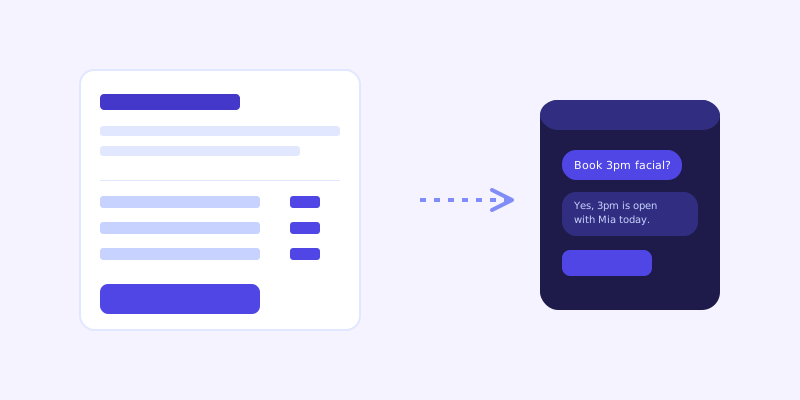
A hair salon mostly fields cut, color, and styling price questions, almost always answerable from a clearly written service menu with starting prices. A day spa or med spa deals with a higher-stakes mix: treatment descriptions, package pricing, and questions about who's qualified to perform a specific procedure, information that needs to be unambiguous since a client comparing providers won't call to ask twice. A nail or lash studio tends to get fast, transactional questions, fill price, appointment length, whether a specific technician is booked, where a quick, confident answer matters more than a long explanation.
Getting your site ready before you connect a chatbot
A few checks make the biggest difference before the first crawl. Make sure every service on the menu lists at least a starting price, since "contact for pricing" is the single fastest way to lose a visitor who was ready to book. Write out cancellation and late-arrival policies in plain text rather than leaving them to be explained only at the appointment, and state clearly whether walk-ins are accepted or everything requires a booking. If certain services are only offered by specific staff members, say so on the service page itself, so the chatbot can answer that question accurately instead of guessing.
What to check once it's live
The unanswered-question log tends to surface real gaps quickly for a salon or spa: a client asking about a service the site never actually lists, a question about parking or studio location that assumed everyone already knows, or someone asking whether a package includes a specific add-on the site never spells out. Each of those is a small content fix, not a chatbot limitation, and fixing it closes a gap that was previously either a missed booking or a client who called a competitor instead of waiting for a reply.
The actual payoff
The value here isn't a chatbot that can talk about hair or skincare in depth. It's one that tells a visitor at 8pm exactly what a service costs, how long to budget, and whether they can actually get in this week, without anyone at the front desk picking up a phone after close to answer it. For a business where a slow reply often means the client simply books somewhere else instead of waiting, that's a real edge, and it comes straight from the same service and pricing content the salon already keeps up for clients reading the site directly.
Frequently asked questions
Can an AI chatbot book an actual appointment for a salon client?
On its own, a crawl-based chatbot answers informational questions like pricing, service length, and policies from the site's content. Whether it can complete a booking depends on whether it's connected to the salon's actual scheduling system; without that connection, the safest setup has it answer clearly and then link directly to the booking page rather than guessing at availability.
How does a chatbot handle pricing that varies by stylist or length of hair?
It answers from whatever the service page actually states, so if pricing is listed as a range or as "starting at" a certain amount tied to hair length or stylist level, the chatbot repeats that same range rather than inventing a single fixed number. Writing pricing clearly on the site, including the factors that change it, is what lets the chatbot answer accurately instead of vaguely.
Will a chatbot know if a specific service is fully booked?
Only if that information is reflected somewhere in text the crawler can reach, since day-to-day booking availability isn't something a website crawl captures on its own. A well-built chatbot stays upfront about that limit, answering menu and policy questions confidently while directing scheduling-specific questions to the actual booking page.
Do I need to retrain the chatbot every time I add a new service or update prices?
No. A crawl-based chatbot reads the service and pricing pages directly, so updating those pages and letting the next scheduled crawl run is enough for the change to show up in the bot's answers, without a separate manual training step for every new service.
Try it yourself
Crawl your salon's pages, get a chatbot that answers bookings instantly →
Build my chatbotMore articles
 Guides
How to Add an AI Chatbot to Your Website Without Code (2026 Guide)
A step-by-step walkthrough for adding a real AI chatbot to your website in minutes, no flow builder and no code required, plus exact install steps for WordPress, Shopify, Wix, and Squarespace.
Read article → Product & AI
Why Your Website Chatbot Keeps Saying "I'm Not Sure" (And How to Fix It)
Most AI chatbots answer from a snapshot of your site taken whenever they were last trained. Here's why that causes constant "I'm not sure" replies, and what a chatbot that checks live instead actually looks like.
Read article →