Why AI Chatbots Make Things Up (And How to Stop It)
Updated July 30, 2026 · 6 min read
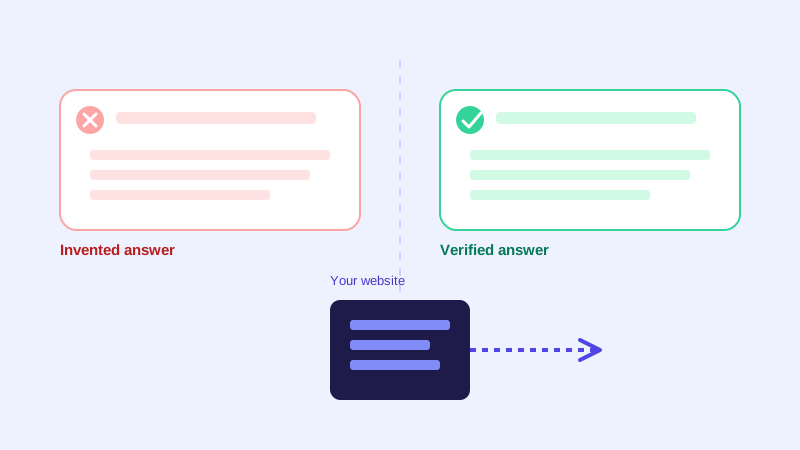
Ask a general-purpose AI chatbot a question it doesn't know the answer to, and it will often do something worse than admit that: it will guess, and state the guess with the same confidence as a fact it actually knows. For a business chatbot answering questions about your pricing, your policies, or your product specs, that's not a quirky AI trait. It's a real liability, because a visitor has no way to tell a confident invention apart from a confident truth.
Two ways a chatbot can fail, and they're opposites
A chatbot that isn't grounded in real information about your business tends to fail in one of two directions. It hedges, defaulting to "I'm not sure" even when the answer is sitting right there on your site. Or it hallucinates, stating something that sounds plausible and specific, a return window, a price, a feature, that simply isn't true. Hedging costs you a frustrated visitor. Hallucinating costs you a customer who acted on wrong information, then finds out later that the bot was wrong, even if no one meant for it to happen.
What actually causes a chatbot to invent an answer
Most hallucination comes from the same source: a language model answering from its general training data instead of from anything specific to your business. A model trained on a huge slice of the internet has seen thousands of return policies, pricing pages, and shipping terms from other companies. When it isn't tightly restricted to your actual content, it can blend that general pattern with your business's name and produce something that reads perfectly, uses the right tone, and is completely made up. The model isn't being deceptive. It's doing exactly what it was built to do, predict a plausible next sentence. Plausible and accurate are not the same thing.
Why grounding in your own website content is the real fix
The fix that actually works is architectural, not a prompt telling the model to "be careful" or "only tell the truth." A properly grounded chatbot retrieves the specific passages from your own crawled website content that are relevant to a question, and answers only from that retrieved material, with a confidence score attached to how well the retrieved content actually matches the question. If nothing in your site content is a good match, a well-built bot says so instead of falling back on general knowledge to fill the gap. This is also why a crawl-based chatbot, one built entirely from your own pages rather than a general assistant with your business name attached, tends to hallucinate far less by default. There's simply less room for it to reach for outside information, because outside information was never part of what it was given to work with.
Grounding isn't automatically perfect
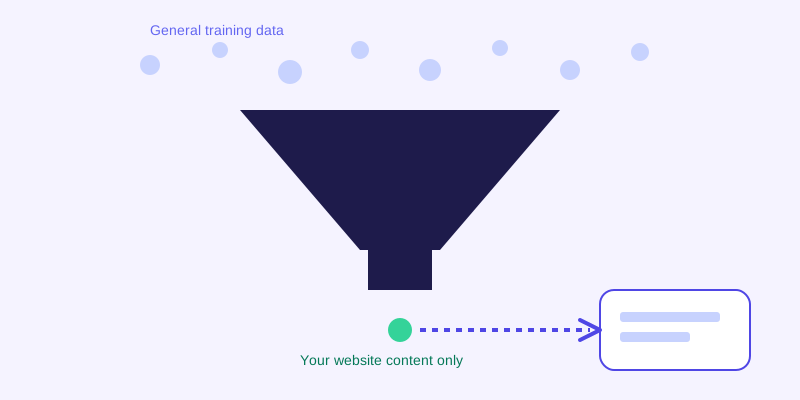
Restricting a bot to your own content removes the biggest source of hallucination, but it doesn't remove every failure mode. A bot can still misapply real information, quoting last year's price from a cached page, mixing details from two different product pages that happen to look similar, or answering confidently from a page that used to be current but no longer is. These are quieter failures than a pure invention, because every fact involved actually did come from your site at some point. That's exactly the situation a live re-check helps with: when a stored answer scores low on confidence, the strongest chatbots go back and read the actual live page before answering, rather than serving up whatever they have stored, however old. The result reads the same to the visitor either way, a confident, specific answer, but one version is checked against what's true today and the other is checked against what was true whenever the last crawl happened to run.
A simple test you can run in five minutes
You don't need to take a vendor's word for how grounded their chatbot actually is. Ask it something with a specific, checkable answer that isn't written anywhere on your site: a made-up promo code, a product you don't sell, a policy you've never had. A well-grounded chatbot will say it doesn't have that information. A chatbot leaning on general knowledge will often invent something confident-sounding instead, sometimes even a plausible-looking discount percentage or timeframe. Try the same test with a question about something that is on your site but phrased unusually, and check whether the bot's answer actually matches what the page says, in substance if not exact phrasing. A mismatch there is a sign the bot is filling gaps rather than retrieving and reporting.
What to check before you trust a chatbot vendor's claims
Every chatbot vendor will tell you their bot "only answers from your content." Few will explain what that actually means under the hood. Ask directly whether the bot's answers are generated from retrieved passages of your own site or from a general-purpose model with your site as loose context. Ask what happens when confidence in the retrieved content is low, whether it hedges, guesses, or checks the live page. And run the five-minute test above yourself rather than relying on a demo that was set up to look good. A chatbot that can't pass a basic test for invented answers is a bigger risk than one that occasionally says it doesn't know something, because a wrong answer stated with confidence is much harder for a customer, or for you, to catch.
The tradeoff worth remembering
Perfect groundedness, where a chatbot never says anything wrong, isn't actually the standard to hold it to. A business's own website can be outdated too, and a bot faithfully repeating an out-of-date price is still repeating something false. What matters is where the bot's answers come from, and how it behaves when it isn't sure. A bot that pulls from your actual content, flags low-confidence situations honestly, and can go check a live page rather than guess, will be wrong far less often, and importantly, wrong for a reason you can actually trace and fix. A bot that hallucinates from general training data is wrong in ways you'll never be able to predict or catch until a customer tells you.
Frequently asked questions
What does it mean for an AI chatbot to hallucinate?
It means the chatbot states something confidently that isn't actually true, often a made-up policy detail, price, or feature, because it's answering from general patterns in its training data rather than from your business's actual content.
How is hallucination different from a chatbot saying it's not sure?
They're opposite failures. A chatbot that hedges too often is being overly cautious even when the real answer exists on your site. A chatbot that hallucinates does the opposite: it states something specific and wrong with the same confidence it would use for something true, which is harder for a visitor to catch.
Can grounding a chatbot in my website content eliminate hallucinations completely?
It removes the largest source of the problem, since the bot no longer has room to reach for outside information it was never given. It doesn't guarantee every answer is current, since a bot can still repeat outdated information from your own site if nothing checks the live page. Pairing grounding with a live re-check for low-confidence answers closes most of the remaining gap.
How can I test whether my chatbot is making things up?
Ask it something specific and checkable that isn't written anywhere on your site, like a promo code you've never offered. A properly grounded chatbot will say it doesn't know. One leaning on general knowledge will often invent a confident, plausible-sounding answer instead.
More articles
 Guides
How to Add an AI Chatbot to Your Website Without Code (2026 Guide)
A step-by-step walkthrough for adding a real AI chatbot to your website in minutes, no flow builder and no code required, plus exact install steps for WordPress, Shopify, Wix, and Squarespace.
Read article → Product & AI
Why Your Website Chatbot Keeps Saying "I'm Not Sure" (And How to Fix It)
Most AI chatbots answer from a snapshot of your site taken whenever they were last trained. Here's why that causes constant "I'm not sure" replies, and what a chatbot that checks live instead actually looks like.
Read article →