AI Chatbot vs FAQ Page: Why a Chatbot Answers Questions an FAQ Page Can't
Updated September 17, 2026 · 6 min read
Almost every business website has an FAQ page, and almost every one of those pages gets built the same way: someone sits down, guesses the ten or fifteen questions visitors probably have, and writes an answer for each. It's a genuinely useful exercise. It's also a fixed list written from one person's guess about what visitors will ask, phrased the way that person happens to phrase things, which is where its limits start to show.
What an FAQ page actually does well
A well-written FAQ page is fast to scan, doesn't require typing anything, and works exactly as well for a search engine crawler as it does for a human visitor, since the questions and answers sit right there in plain text. For the handful of questions a business anticipated correctly and phrased the way most visitors actually search for them, an FAQ page answers instantly with zero setup cost beyond writing it once. That's a real advantage a chatbot doesn't erase.
Where an FAQ page runs into its own limits
The problem is everything an FAQ page didn't anticipate. A visitor rarely phrases a question the exact way a business wrote it down. "Do you ship to Canada" and "can I get this internationally" are the same question asked two different ways, but a visitor scanning a static list has to either spot the one that matches or give up and leave. And an FAQ page only grows by someone remembering to add a new entry, which means it drifts out of date the moment a policy changes, a new service launches, or a question starts coming up that nobody thought to include when the page was first written.
What changes when a chatbot reads the same content
A chatbot built by crawling a website doesn't replace the FAQ page's content, it reads it, along with everything else on the site, pricing pages, policy pages, service pages, and answers from all of it based on what a visitor actually typed, not which entry they managed to find. The same underlying information that used to live only in a fixed list becomes searchable by meaning instead of by exact wording, which closes the biggest gap an FAQ page has on its own.
The phrasing problem an FAQ page can't solve
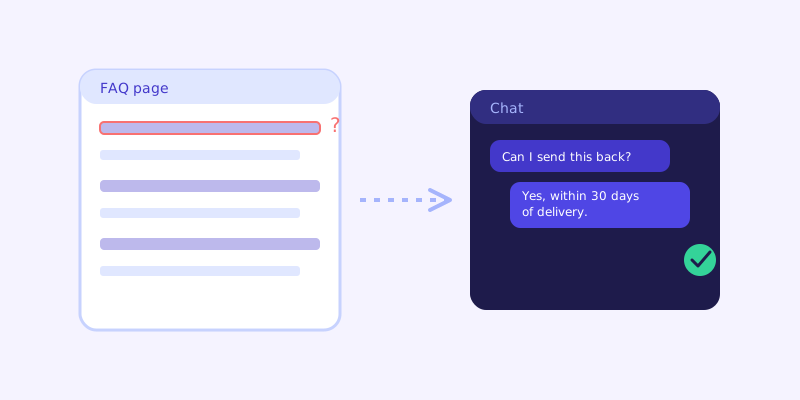
This is the part that matters most in practice. A static FAQ entry titled "What is your return policy" simply doesn't match a visitor who types "can I send this back if it doesn't fit," not because the answer isn't there, but because the visitor never sees the entry that already answers it. A chatbot matches on meaning rather than exact phrasing, so it can pull the same underlying return policy content and answer the question as the visitor actually asked it. The information was never missing from the site. It was just unreachable by anyone who didn't happen to search using the business's own wording.
Does a chatbot make an FAQ page pointless
No, and it's worth keeping one anyway. An FAQ page still helps visitors who prefer to scan rather than type, it's still indexable by search engines the way a chat conversation isn't, and it gives a chatbot a clean, already-organized source of the exact questions a business considers most important. The strongest setup treats the FAQ page as one well-structured input into the chatbot's knowledge base, not a separate, competing feature. Visitors who want to scan still can, and visitors who'd rather just ask get an answer even if their question doesn't match a single entry on the page.
Where live-fallback matters for FAQ-style content specifically
An FAQ page is exactly the kind of content that goes stale quietly, since it's usually written once and rarely revisited even after the underlying policy changes. When a chatbot's stored answer about something FAQ-shaped, a return window, a warranty length, a support hours question, scores low confidence, the stronger design re-fetches the live page before answering rather than repeating whatever the FAQ said at crawl time. That catches the exact case where someone updated the actual policy page but forgot the FAQ still lists the old number.
How to actually decide
Keep the FAQ page if it already exists, it costs nothing to leave up and still serves visitors who prefer to scan. Add a chatbot on top of it, and on top of the rest of the site, if a meaningful share of visitor questions don't match any existing FAQ entry closely enough to actually get answered, which is nearly always the case once you look at real search behavior rather than the list of questions the page's author originally guessed. The honest way to know is watching what a chatbot's unanswered-question log surfaces after a few weeks live, since it shows exactly which real questions the FAQ page was never going to catch.
Frequently asked questions
Should a business remove its FAQ page after adding an AI chatbot?
No. An FAQ page still helps visitors who prefer to scan rather than type, and it remains indexable by search engines in a way a chat conversation isn't. The strongest setup uses the FAQ page as one input into the chatbot's knowledge base rather than treating the two as competing features.
Why doesn't a visitor always find the answer that's already on an FAQ page?
A static FAQ page only matches a visitor who phrases their question close to how the page's author wrote it. A chatbot matches on meaning instead of exact wording, so a question phrased completely differently from any FAQ entry can still be answered from that same underlying content.
Does an AI chatbot need a separate FAQ page to work well?
No, a crawl-based chatbot reads a business's entire site, pricing, policy, and service pages included, not just a dedicated FAQ page. An existing FAQ page helps because it's already organized around the questions a business considers most important, but it isn't required.
How can a business tell if its FAQ page is missing real visitor questions?
The unanswered-question log a chatbot builds up after going live is the clearest signal, since it shows the actual questions visitors typed that didn't match anything confidently, which is a far more reliable list than guessing what to add to an FAQ page from scratch.
More articles
 Guides
How to Add an AI Chatbot to Your Website Without Code (2026 Guide)
A step-by-step walkthrough for adding a real AI chatbot to your website in minutes, no flow builder and no code required, plus exact install steps for WordPress, Shopify, Wix, and Squarespace.
Read article → Product & AI
Why Your Website Chatbot Keeps Saying "I'm Not Sure" (And How to Fix It)
Most AI chatbots answer from a snapshot of your site taken whenever they were last trained. Here's why that causes constant "I'm not sure" replies, and what a chatbot that checks live instead actually looks like.
Read article →