Does Live-Fallback Cost You Extra? How Real-Time Page Re-Checks Fit Flat-Rate Pricing
Updated October 5, 2026 · 7 min read
It's a reasonable question to ask: if a chatbot's live-fallback feature re-fetches a page in real time and then re-embeds that content back into the knowledge base, isn't that doing meaningfully more work than a normal lookup, and shouldn't that show up on the bill somewhere? The short answer is no, and the reason comes down to how the feature is designed to behave in the first place, not a subsidy that quietly runs out.
What actually happens during a live-fallback check
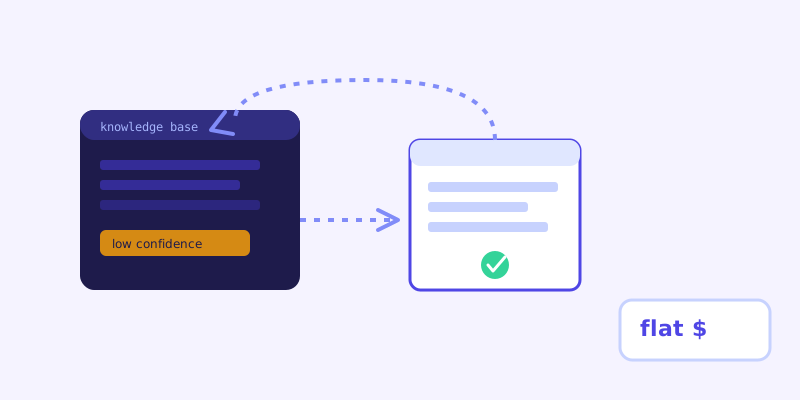
When a visitor asks something the stored knowledge base can't confidently answer, the system identifies the page most likely to contain the answer and re-fetches it on the spot, right then, in the middle of that one conversation. It reads the current version of that page, answers from what it just found, and folds that fresh content back into the knowledge base so the next visitor asking the same thing gets a confident answer from storage, without needing another live fetch at all. That last part is the key to why this doesn't behave like a metered feature: each specific gap only gets re-checked live once, not every time it comes up.
Why this doesn't scale into a per-use cost
A metered pricing model usually exists because a vendor's cost rises roughly in proportion to how often a feature runs, so the price has to rise with it or the vendor loses money on heavy users. Live-fallback doesn't follow that shape. The moment a live check resolves a gap, that gap closes, it gets written back into the stored knowledge base, so the exact same question asked again doesn't trigger another live fetch. Usage of this specific feature is self-limiting by design: a well-maintained site with a reasonably complete crawl triggers it rarely, and even a site with real gaps sees each one trigger it once, not on every repeat visit.
What a flat-rate plan is actually betting on
A flat monthly price assumes your typical usage falls in a normal range, not that every feature costs the vendor exactly zero to run. The bet with live-fallback specifically is that it's used for genuine edge cases and freshly changed content, not as the primary way every question gets answered. If a chatbot were relying on live fetches for most conversations, that would signal a different problem entirely, a knowledge base that was never properly built out, not a pricing model under strain.
How this differs from a per-message vendor handling the same feature
A vendor billing per message or per conversation has a direct incentive to count a live re-check as an extra billable event, since their whole pricing model is built around counting activity. That's not a design choice about the feature itself, it's a consequence of how the rest of their pricing works. A flat-rate plan that includes live-fallback as a standard part of the product has no equivalent incentive to carve it out separately, since the plan was never counting individual actions to begin with.
What to actually watch for as a customer
The more useful question isn't whether live-fallback itself costs extra, it's whether a vendor caps something else that effectively limits how often the feature can run: a monthly page-crawl allowance, a hard ceiling on total crawled pages, or a seat limit that forces an upgrade once your site grows. Those caps function like metering even when the pricing page says flat rate. Ask directly what's capped on a given plan and what happens when you cross it, since that answer matters more than whether one specific feature has its own line-item price.
The practical takeaway
Live-fallback is built to close knowledge gaps permanently, not to be a recurring cost center, which is exactly why it sits comfortably inside a flat per-plan price instead of needing its own meter. The feature doing its job well, closing a gap once and remembering it, is also what keeps it cheap to offer at a flat rate in the first place.
Frequently asked questions
Does triggering live-fallback use up part of my plan's limits?
No, live-fallback itself isn't billed as a separate metered action. What matters for plan limits is usually things like total pages crawled or seats, not how many times a live re-check happens, since each specific gap it resolves gets folded back into the stored knowledge base and typically doesn't need to be re-checked again.
Why doesn't live-fallback get more expensive the more it's used?
Because each live check that resolves a question closes that gap permanently by updating the stored knowledge base, so the same question doesn't trigger another live fetch later. Usage of the feature is naturally self-limiting rather than growing in proportion to traffic the way a per-message cost would.
If my site has a lot of gaps, will live-fallback run constantly and slow things down?
It can run more often on a site with real content gaps, but each trigger closes that specific gap for future visitors, so the frequency drops over time as the knowledge base fills in. A site with thin or outdated content will see it more at first, which is itself a useful signal that the underlying pages need attention.
What should I actually check on a vendor's pricing page instead?
Ask what's capped on your plan, pages crawled, seats, or a message ceiling, and what happens when you cross it: an automatic upgrade, a hard cutoff, or an overage charge. That answer tells you more about real cost under normal usage growth than whether any single feature like live-fallback has its own separate price.
More articles
 Guides
How to Add an AI Chatbot to Your Website Without Code (2026 Guide)
A step-by-step walkthrough for adding a real AI chatbot to your website in minutes, no flow builder and no code required, plus exact install steps for WordPress, Shopify, Wix, and Squarespace.
Read article → Product & AI
Why Your Website Chatbot Keeps Saying "I'm Not Sure" (And How to Fix It)
Most AI chatbots answer from a snapshot of your site taken whenever they were last trained. Here's why that causes constant "I'm not sure" replies, and what a chatbot that checks live instead actually looks like.
Read article →