Flat Rate vs Per Message AI Chatbot Pricing: What You're Actually Signing Up For
Updated July 30, 2026 · 6 min read
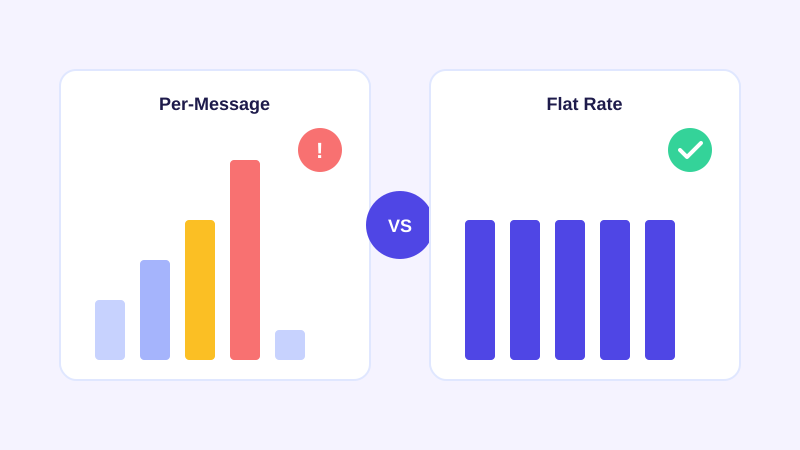
If you've priced out more than one AI chatbot vendor, you've probably run into two very different pricing models sitting side by side: a flat monthly rate that covers a set of features, and a credit-based model that charges per message, per conversation, or per resolution. They can look nearly identical on a pricing page. They behave very differently once your chatbot is actually working.
How credit-based pricing actually works
In a per-message or per-credit model, every exchange between a visitor and the bot draws down a metered allowance included in your plan. A conversation might count as one credit, or each back-and-forth message might count separately, depending on the vendor. Once you're through the included allowance, you either pay overage fees per additional message, get bumped to a higher tier automatically, or the bot stops answering until the next billing cycle resets the counter.
On paper this looks fair: light users pay less, heavy users pay more. In practice it means the metric your bill is tied to is usage you don't fully control and can't predict in advance. A blog post that goes viral, a product launch, a sale, or just normal month-to-month traffic growth all move that number the same direction: up.
A concrete example makes the shape of the problem clearer. Say a plan includes 1,000 conversations a month at a set price, with anything past that billed per additional conversation. A slow month at 600 conversations costs exactly the base price. A month where a product launch or a seasonal sale doubles your traffic to 2,200 conversations means paying the base price plus 1,200 overage units, which can push a bill well past double for a month that was, by every other measure, a genuine success.
Why this becomes a problem at exactly the wrong time
A support chatbot's entire job is to handle more of your customer questions so your team handles fewer. If it's doing that job well, usage goes up. Under credit-based pricing, that success shows up on your invoice as a cost increase, or worse, as your bot getting throttled during the exact traffic spike when you needed it most, like a launch day or a sale weekend when support volume is naturally at its highest.
That's the core mismatch: the moments your chatbot is most valuable to you, a surge in visitors, a spike in questions, are also the moments a metered pricing model charges you the most, or cuts you off. You end up either overpaying to stay safely under a ceiling you're not sure you'll hit, or gambling on hitting a wall mid-month.
What flat-rate pricing looks like instead
A flat per-plan model charges for a tier of features (site count, seats, response volume ceilings generous enough not to matter for a normal business) rather than for each individual conversation. You know your monthly cost before the month starts, and a good month of visitor traffic doesn't turn into a bad month for your budget. Running a promotion, getting picked up on social media, or simply growing doesn't put your support tool at odds with your finance team.
The tradeoffs to actually watch for
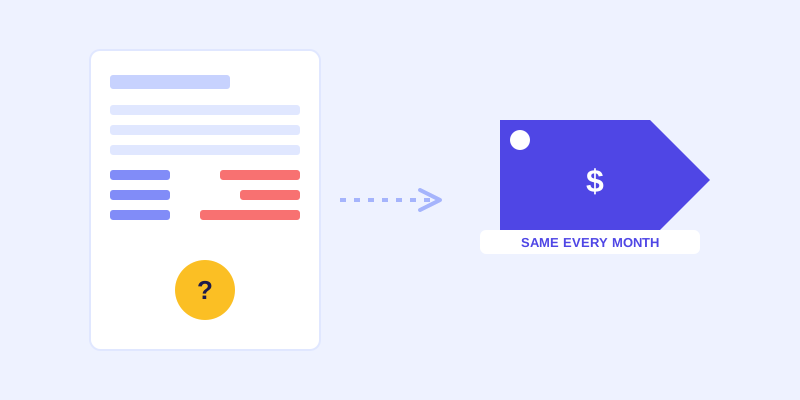
Flat pricing isn't automatically better just because it's flat. Some vendors relabel the same metering under a different name: a small plan that caps you at a low number of pages crawled, a tight seat count, or a message ceiling that functions exactly like a credit system once you hit it, just described differently. The label isn't what matters. What matters is whether normal usage growth changes your bill, and what actually happens when you cross a limit: an automatic tier bump you can see coming, a hard cutoff, or a surprise invoice.
None of this means every usage-based number is a trap, or that every flat number is generous. A flat plan with a page-crawl cap so low it can't cover your actual site, or a seat limit that forces you onto a pricier tier the moment you add a second team member, behaves like metering with extra steps. The distinction that actually matters is whether the number that caps you moves in step with ordinary month-to-month growth, or whether it's set high enough that a normal business simply doesn't think about it.
How to compare two chatbot quotes side by side
Before signing up for either model, estimate your realistic peak month, not your average one: a launch, a sale, a seasonal spike. Then ask each vendor directly what that peak month costs, not what the advertised base price is. For a credit-based vendor, ask what a message costs past the included allowance and whether the bot stops answering or just bills more. For a flat-rate vendor, ask what's actually capped (sites, seats, pages) and what happens if you exceed it. The advertised monthly number is only useful once you know what it does under real, uneven traffic.
The real question to ask before you commit
A pricing model tells you what a vendor optimized for. A model that bills more as your chatbot gets used more is optimized to capture your success as revenue. A flat model is optimized for you to actually use the thing you're paying for, since using it more doesn't cost you more. Before you commit to either, ask which one you'd rather be tied to on the one month everything goes right.
This is also worth checking before you're locked into an annual contract, since a rate that looked reasonable at the demo stage is much harder to renegotiate once your team already depends on the bot day to day. A short trial period on a real month of your own traffic tells you more about the true cost than any sales conversation will.
Frequently asked questions
What is credit-based or per-message chatbot pricing?
It's a pricing model where your monthly bill is tied to how many messages, conversations, or resolutions the chatbot handles, similar to metered API pricing. Plans include a set allowance, and going over it triggers overage fees, an automatic tier upgrade, or the bot no longer answering until the next billing cycle.
Why does per-message chatbot pricing get expensive as a business grows?
Because the thing you're billed on, chatbot usage, rises with exactly the traffic and support volume you want, like a product launch, a promotion, or normal growth. The better the bot performs, the more it's used, and the more a metered plan charges for that same success.
Is flat-rate chatbot pricing always cheaper than per-message pricing?
Not automatically. It's predictable rather than guaranteed cheaper. The real comparison is what happens in your highest-traffic month under each model: a flat plan keeps that month's cost the same as any other, while a metered plan can charge significantly more or throttle the bot right when you need it most.
What should I ask a chatbot vendor before signing up for usage-based pricing?
Ask exactly what counts as a billable unit (a message, a conversation, a resolution), what the overage cost is once you exceed the included allowance, and whether the bot keeps answering past that point or simply stops until the next cycle. Compare that answer against your realistic peak month, not your average one.
More articles
 Guides
How to Add an AI Chatbot to Your Website Without Code (2026 Guide)
A step-by-step walkthrough for adding a real AI chatbot to your website in minutes, no flow builder and no code required, plus exact install steps for WordPress, Shopify, Wix, and Squarespace.
Read article → Product & AI
Why Your Website Chatbot Keeps Saying "I'm Not Sure" (And How to Fix It)
Most AI chatbots answer from a snapshot of your site taken whenever they were last trained. Here's why that causes constant "I'm not sure" replies, and what a chatbot that checks live instead actually looks like.
Read article →