How AI Chatbot Knowledge Bases Actually Work (In Plain English)
Updated August 3, 2026 · 8 min read
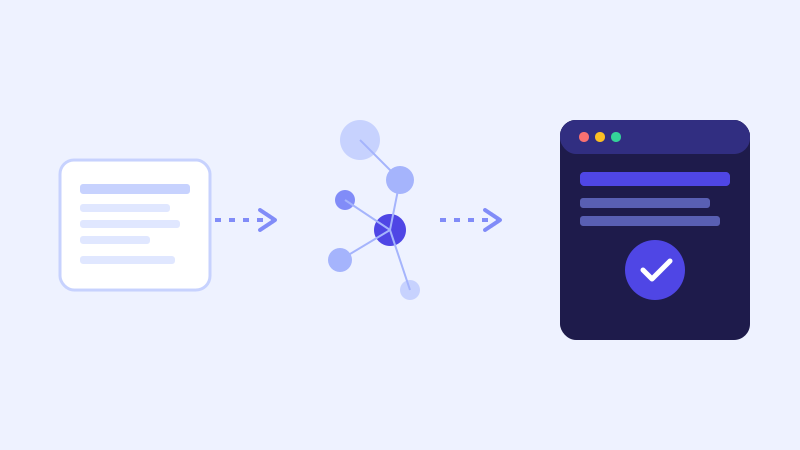
Ask most chatbot vendors how their product works and you'll get a sentence like "it's trained on your website using AI." That's technically true and explains almost nothing useful. Underneath that sentence is a specific, fairly mechanical pipeline, and understanding it makes it much easier to judge whether a given chatbot will actually be accurate on your site, rather than just taking a vendor's word for it.
Step one: crawling turns your site into raw text
The process starts with a crawler visiting your public pages the way a search engine would, following links from page to page and pulling out the readable text: paragraphs, headings, list items, table contents. Images, decorative elements, and navigation menus are generally filtered out or deprioritized, since they're not useful source material for answering a question. What comes out of this step is a large but plain collection of text tied back to the page it came from.
Step two: chunking breaks that text into manageable pieces
A whole page of text is usually too long and too mixed in topic to hand to a model as one unit, so it gets split into smaller chunks, often a paragraph or a section at a time. This matters more than it sounds like it should. Split too coarsely, and a chunk mixes unrelated information, like a paragraph that starts by describing your refund policy and ends with unrelated shipping details, and the more precise part often gets diluted or lost when the model reads over it. Split too finely, and a chunk loses the surrounding context needed to make sense of it, like a lone sentence stating a number with no explanation of what the number refers to. Good chunking tends to follow the natural structure of the page, headings and paragraphs, rather than cutting text at an arbitrary fixed length.
Step three: embeddings turn each chunk into something searchable by meaning
Each chunk of text gets converted into an embedding, a list of numbers that represents the meaning of that text in a form a computer can compare mathematically. The useful property of an embedding is that chunks with similar meaning end up numerically close to each other, even if they don't share the same exact words. This is why a well-built chatbot can match a visitor asking "can I send this back" to a chunk about your return policy, even though the visitor never used the word "return" or "policy" at all. A basic keyword search would miss that match entirely, since it depends on matching words. Embeddings match on meaning instead.
Step four: retrieval finds the chunks actually relevant to a question
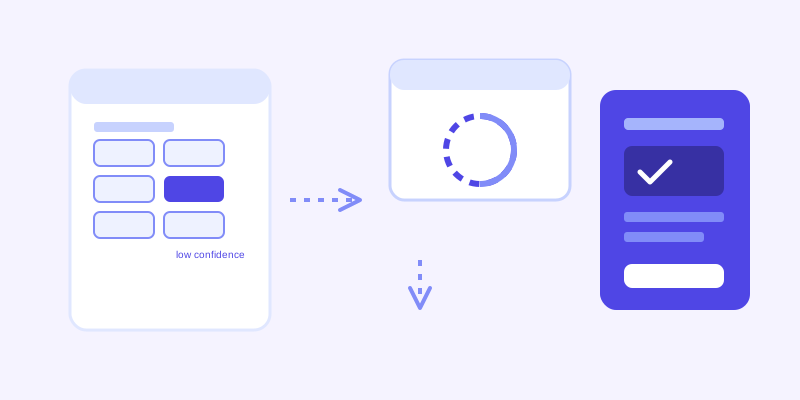
When a visitor asks something, their question also gets converted into an embedding, and the system compares it against every stored chunk to find the closest matches by meaning. This is retrieval, and it's the step that decides what the model is even allowed to look at when forming an answer. A well-built retrieval step also produces a confidence score for the best matches, a rough measure of how closely the top chunks actually relate to the question, not just the closest chunks out of whatever exists.
Step five: generation writes the actual reply, grounded in what was retrieved
The retrieved chunks, along with the visitor's question, get handed to a language model with instructions to answer using only that retrieved material. This is the difference between a grounded chatbot and a general-purpose one: the model isn't reaching into everything it learned during training, it's reading a small set of passages pulled specifically from your site and writing a reply based on those passages, the same way a person would answer a question by reading the relevant paragraph of a document rather than answering from memory.
The step most vendors skip: what happens when confidence is low
Every step above can go right and the system can still hit a question where nothing in the stored knowledge base scores as a good match, either because the crawl missed the page, the site never covered it, or the site has genuinely changed since the last crawl. A basic chatbot just answers with whatever the closest chunk was anyway, confidence score ignored, which is exactly how a bot ends up stating something wrong with total confidence. The stronger design treats a low confidence score as a signal to do something different: re-fetch the specific live page that scored closest, read its current content, and answer from that instead of the stale stored chunk. The visitor never sees this happen, they just get a correct answer instead of a stale or invented one, and the fresh content gets folded back into the stored knowledge base afterward so the same question doesn't need another live fetch next time.
Why this whole pipeline matters more than the marketing language around it
None of these five steps, crawling, chunking, embedding, retrieval, generation, are exotic on their own. What separates a chatbot that answers well from one that hedges constantly or occasionally invents an answer is how carefully each step is actually implemented: whether chunking respects the structure of the page, whether retrieval produces a real confidence score instead of just always returning its best guess, and whether low confidence triggers something smarter than a generic apology. The pipeline is the product. The one-line description on a pricing page is not.
Frequently asked questions
What is an embedding in the context of an AI chatbot?
An embedding is a numeric representation of a piece of text that captures its meaning, not just its exact words. It lets a chatbot match a visitor's question to relevant content on your site even when the visitor phrases things completely differently than the page itself does.
What does it mean for a chatbot to 'retrieve' an answer?
Retrieval is the step where a visitor's question is compared against every stored chunk of your website content to find the closest matches by meaning. Only those matched chunks are handed to the model to generate a reply from, rather than the model answering from general knowledge.
Why does chunking website content matter for chatbot accuracy?
How text gets split into chunks affects what the retrieval step can actually find. Chunks that are too broad mix unrelated topics together and dilute the specific answer, while chunks that are too narrow lose the context needed to make sense of them. Good chunking generally follows a page's natural structure, headings and paragraphs, rather than a fixed arbitrary length.
What happens when a chatbot's retrieval step finds a low-confidence match?
A basic chatbot answers anyway using whatever content scored closest, which is a common cause of confidently wrong answers. A stronger design treats low confidence as a trigger to re-fetch the live page that scored closest and answer from its current content instead, then saves that fresh content back into the knowledge base for future questions.
More articles
 Guides
How to Add an AI Chatbot to Your Website Without Code (2026 Guide)
A step-by-step walkthrough for adding a real AI chatbot to your website in minutes, no flow builder and no code required, plus exact install steps for WordPress, Shopify, Wix, and Squarespace.
Read article → Product & AI
Why Your Website Chatbot Keeps Saying "I'm Not Sure" (And How to Fix It)
Most AI chatbots answer from a snapshot of your site taken whenever they were last trained. Here's why that causes constant "I'm not sure" replies, and what a chatbot that checks live instead actually looks like.
Read article →