How Often Does ChatCrawl Re-Crawl Your Website? Scheduled Crawls vs Live-Fallback Explained
Updated September 21, 2026 · 6 min read
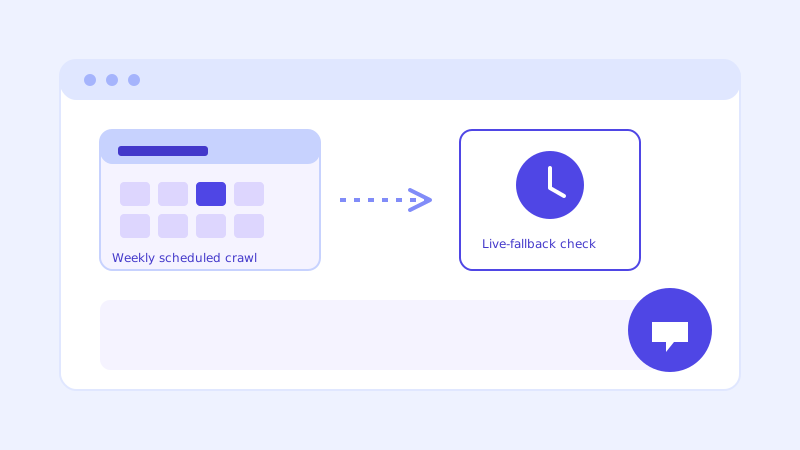
"How often does it re-crawl my site" is one of the first questions anyone asks once they understand that a chatbot's knowledge base comes from reading a website rather than a manually typed script. It's a fair question, and the honest answer has two parts: a recurring schedule that keeps the knowledge base broadly current, and a second, separate mechanism that catches the gap between scheduled crawls the moment it actually matters.
Why "train once" chatbots go stale
A chatbot trained on a single crawl at setup is only ever as current as the day it launched. Pricing changes, a policy gets updated, a new service gets added, and the bot keeps confidently repeating whatever it read on day one, since nothing ever told it to look again. This is the failure mode that makes a chatbot feel untrustworthy over time even though nothing about the underlying model changed, the site simply moved on without it.
The scheduled re-crawl: how the knowledge base stays current
ChatCrawl re-crawls a connected site on a recurring schedule, weekly is common, so that routine content changes, updated pricing, a new page, a revised policy, get picked up without anyone having to remember to trigger anything. This is the baseline layer of freshness: it doesn't require a person to notice a change happened, it just runs on its own and folds whatever's new into the stored knowledge base. A site owner can also trigger a re-crawl manually right after a major update, a price change or a new service launch, rather than waiting for the next scheduled run.
Why a schedule alone still leaves a gap
Even a tight weekly schedule has a blind spot: the days between crawls. A dealership's inventory can turn over in an afternoon, a restaurant's daily special exists for exactly one day, and a clinic's new-patient status can change mid-week. None of that fits neatly into a once-a-week refresh, and a chatbot that only re-crawls on a timer will confidently answer with whatever it read last, right up until the next scheduled run happens to catch the change. For fast-moving content, that gap is exactly where a wrong answer slips through.
Live-fallback: the check that happens the moment it's needed
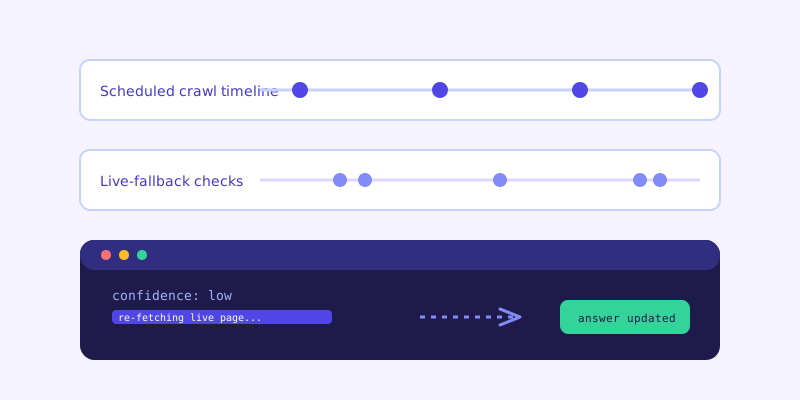
This is what live-fallback is built to close. Instead of waiting for the next scheduled crawl, the moment a stored answer scores too low to confidently answer a specific question, the bot re-fetches the single closest matching page live, checks whether the current version resolves the question, and answers from that instead of the stale stored chunk. The visitor never sees this happen, they just get a correct, current answer instead of a hedge or a stale one. The fresh content then gets folded back into the stored knowledge base, so the next visitor asking the same thing gets the current answer without triggering another live check.
How the two mechanisms work together
The scheduled crawl and live-fallback aren't competing approaches, they cover two different problems. The schedule keeps the whole knowledge base broadly current without anyone lifting a finger, refreshing content nobody's actively asking about yet. Live-fallback is narrower and faster, it only fires on a specific low-confidence question, but it closes the exact gap a schedule can't, the days between runs, on the one page that actually matters for that one question. Together, most of a site stays current through the recurring schedule, while the handful of fast-moving pages, pricing, availability, hours, get caught in real time whenever someone actually asks about them.
What this means for you day to day
In practice, this means you don't need to manually re-crawl after every small site update to keep your chatbot accurate. Routine changes get picked up on schedule, and anything urgent enough to cause a wrong answer in the meantime gets caught live the moment a visitor asks about it. The one thing worth doing yourself is triggering a manual re-crawl right after a change big enough that you don't want to rely on live-fallback catching it question by question, a full pricing overhaul or a site redesign are good examples.
It also changes how you should think about which pages need the most attention. A page that rarely changes, an about page, a general services overview, doesn't need special handling either way, the scheduled crawl keeps it current with plenty of margin. A page that changes constantly, inventory, availability, daily pricing, is exactly where live-fallback earns its keep, since no realistic crawl schedule could keep pace with it on its own. Knowing that distinction helps explain why a chatbot can feel accurate on fast-moving content without needing a crawl schedule tight enough to be impractical.
The actual payoff
The point of running two freshness mechanisms instead of one is that neither has to be perfect on its own. A schedule tight enough to catch everything in real time would mean re-crawling constantly, wasteful for content that barely changes. A live check alone, with no baseline schedule, would mean nothing ever gets refreshed until someone happens to ask about it. Running both means the knowledge base stays broadly current on its own, and the specific moment accuracy matters most, a visitor asking a question right now, gets its own dedicated check rather than depending on when the last scheduled crawl happened to run.
Frequently asked questions
How often does ChatCrawl re-crawl my site?
On a recurring schedule, weekly is common, so routine content changes get picked up automatically. You can also trigger a re-crawl manually right after a significant update, like a pricing change or a new page, rather than waiting for the next scheduled run.
Can I trigger a re-crawl manually?
Yes. While the scheduled crawl runs on its own, triggering one manually right after a major site change means the update is reflected immediately instead of waiting for the next scheduled cycle.
Does live-fallback replace the need for scheduled crawls?
No, they cover different problems. The scheduled crawl keeps the whole knowledge base broadly current without anyone needing to ask about a specific page first. Live-fallback only fires on a single low-confidence question, closing the gap between scheduled crawls for exactly the page that matters right then.
Does a live-fallback check slow down the chatbot's answer?
It only fires when a stored answer scores too low to confidently answer on its own, which is a small share of total questions, not every conversation. Most answers come straight from the already-crawled knowledge base at normal speed, and the live re-check only adds a step for the specific questions that genuinely need it.
More articles
 Guides
How to Add an AI Chatbot to Your Website Without Code (2026 Guide)
A step-by-step walkthrough for adding a real AI chatbot to your website in minutes, no flow builder and no code required, plus exact install steps for WordPress, Shopify, Wix, and Squarespace.
Read article → Product & AI
Why Your Website Chatbot Keeps Saying "I'm Not Sure" (And How to Fix It)
Most AI chatbots answer from a snapshot of your site taken whenever they were last trained. Here's why that causes constant "I'm not sure" replies, and what a chatbot that checks live instead actually looks like.
Read article →