Switching From a Flow-Builder Chatbot to a Crawl-Based One: What Actually Changes
Updated August 27, 2026 · 6 min read
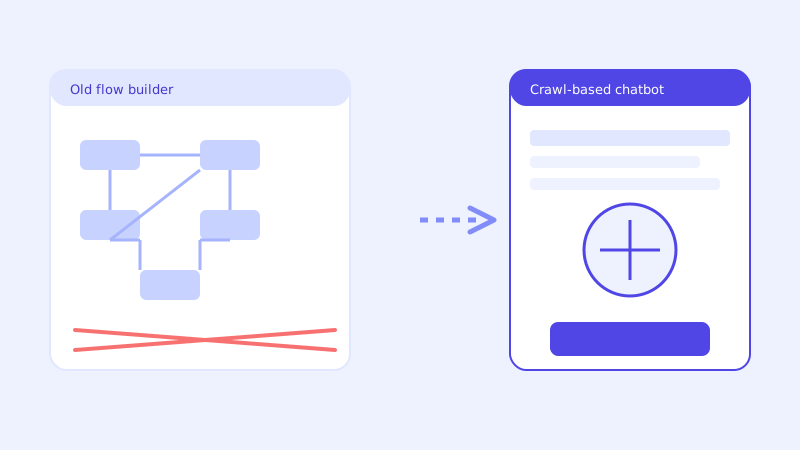
A business that installed a chatbot a year or two ago usually did it the way every vendor asked at the time: build a flow, write intents, attach sample phrases to each one, and keep tweaking it as gaps showed up. That process took real time to set up, and it keeps taking real time to maintain every time a price changes or a new service gets added. Switching to a chatbot that reads the website directly instead sounds like a bigger project than it is, mostly because the old process trained everyone to expect chatbot setup to be a project in the first place.
What a flow-builder chatbot actually requires from you
A flow-builder tool asks you to model conversations before the bot has ever seen your business: drag boxes onto a canvas, define intents, write sample phrases for each one, and test until the bot stops misfiring on real phrasing. Every time your pricing changes, a new service launches, or a policy gets updated, someone has to go back into that same canvas and update the relevant flow by hand, or the bot keeps giving the old answer indefinitely. The chatbot doesn't drift because it's broken. It drifts because nobody rebuilt the flow to match what changed on the actual website.
What actually changes when you switch
A crawl-based chatbot removes the flow-building step entirely. Instead of manually defining what the bot should say for each scenario, you point it at your website, and it builds a knowledge base directly from the pages you already maintain, your pricing, your FAQ, your policies, your services. There's no canvas to design and no intents to write. The setup work shifts from building a conversation structure to making sure your website itself actually says the things customers ask about, which is usually a much shorter list of fixes than rebuilding a flow from scratch.
What doesn't carry over, and why that's fine
Your old flows, intents, and sample phrases don't transfer, and they don't need to. None of that structure is doing anything for you that a direct crawl of your current site content doesn't already accomplish, usually with fewer gaps, since a flow only covers what someone thought to build a branch for, while a crawl covers whatever's actually written on the page. Old conversation transcripts and lead records from your previous tool are a separate export question worth checking with that vendor directly, but they're historical data, not something the new chatbot needs in order to work correctly from day one.
The part worth doing before you switch, not after
The single highest-leverage step before switching is the same one worth doing for any crawl-based setup: confirm your pricing, policies, hours, and FAQ actually say what customers ask about, in plain text rather than a PDF or an image. A flow-builder bot can paper over thin website content with a hand-written answer baked into a flow. A crawl-based bot can only answer what the site itself says, so a gap that was quietly patched by an old flow will show up in the new chatbot's unanswered-question log within the first few days. That's not a step backward, it's the fastest way to find out where your website itself needs a fix, independent of which chatbot is reading it.
What the switch looks like in practice
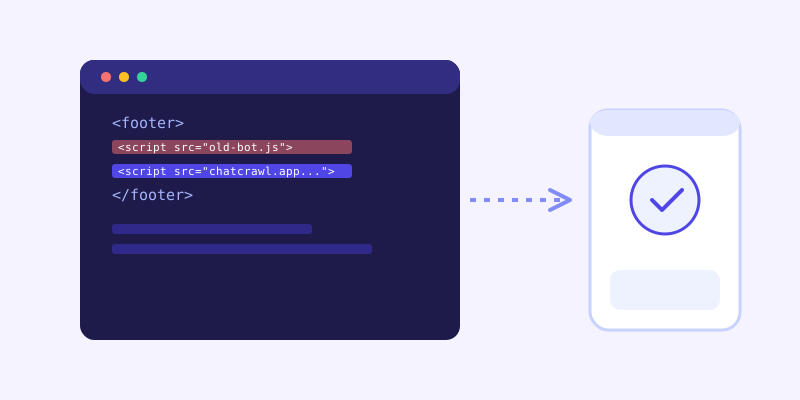
The mechanical part is genuinely small: paste your website URL in, let the crawl run, customize the widget's appearance to match what visitors are used to seeing, and swap one script tag in your site's footer for the new one. The old widget can stay live until the new one is tested and ready, and the changeover itself is a matter of replacing a single line of code, not a migration weekend. Most of the actual time investment goes into the content check above, not the technical swap. It's worth running both widgets side by side for a day or two on a staging version of the site, asking each one the same handful of real customer questions, so you can see the difference in coverage directly rather than taking it on faith before flipping the switch on the live site.
What you gain that a flow-builder tool structurally can't offer
Beyond skipping the setup labor, a crawl-based chatbot keeps itself current the way a flow-builder bot never will on its own: re-crawling on a schedule so a price or policy change eventually gets picked up automatically, and, in a well-built version, checking the live page in real time when a stored answer looks uncertain rather than repeating a stale flow response indefinitely. A flow-builder bot's accuracy is a ceiling set the day someone last edited it, and that ceiling only ever moves when someone remembers to go back and raise it. A crawl-based bot's accuracy tracks your website's own accuracy instead, which is a ceiling you're already maintaining for every other reason, whether or not a chatbot is reading it.
What to watch in the first few weeks after cutover
Compare the new chatbot's unanswered-question log against how your old bot actually performed, not against how it was supposed to perform. Most teams find the new bot resolves things the old flow never had a branch for, while surfacing a smaller number of genuine content gaps worth fixing on the website itself. Treat that first couple of weeks as the same short content cleanup any new crawl-based setup goes through, rather than assuming the switch itself introduced a problem.
The actual payoff
The value in switching isn't a fundamentally different kind of chatbot experience for visitors, it's removing the ongoing maintenance burden that made the old one slowly fall behind the business it was supposed to represent. A chatbot that reads your site directly stays only as current as your last website update, which for most businesses is a much shorter gap than the last time someone had the time to go back into a flow-builder canvas and fix it by hand.
Frequently asked questions
Do I lose my old chatbot's conversation history when I switch?
Historical transcripts and lead records stay with your previous vendor unless you export them separately, which is worth checking with that vendor directly before cutover. The new chatbot doesn't need that history to work correctly, since it builds its knowledge base fresh from your current website content rather than from past conversations.
Do I need to rebuild my old flows or intents in the new chatbot?
No. A crawl-based chatbot doesn't use flows or intents at all, it reads your website's pages directly and answers from that content. None of the structure from a flow-builder tool needs to be recreated, which is most of why switching is a smaller project than the original setup was.
How long does switching from a flow-builder chatbot actually take?
The technical part, crawling your site, customizing the widget, and swapping the embed code, typically takes minutes. The part worth spending real time on is checking that your pricing, policies, and FAQ pages actually say what customers ask about, since a crawl-based bot can only answer what's written on the page.
Will visitors notice a difference after switching chatbots?
Mainly in accuracy and coverage. Visitors should notice the new bot answering questions the old flow never had a branch for, and fewer generic hedges on things that are actually written on the site. The widget's appearance can be customized to match what visitors are already used to seeing, so the visual change can be as small or as large as you want it to be.
Try it yourself
Crawl your site and replace your old chatbot in minutes on ChatCrawl →
Build my chatbotMore articles
 Guides
How to Add an AI Chatbot to Your Website Without Code (2026 Guide)
A step-by-step walkthrough for adding a real AI chatbot to your website in minutes, no flow builder and no code required, plus exact install steps for WordPress, Shopify, Wix, and Squarespace.
Read article → Product & AI
Why Your Website Chatbot Keeps Saying "I'm Not Sure" (And How to Fix It)
Most AI chatbots answer from a snapshot of your site taken whenever they were last trained. Here's why that causes constant "I'm not sure" replies, and what a chatbot that checks live instead actually looks like.
Read article →